
This is the launcher from PolyConsoleA game platform I'm building, with apps on Android and an online social service behind them., the Emulator frontendThe program you see and use: it shows your games, takes your controller, and hands the emulation itself to an emulator core. I've been building for my TV. Use the arrow keys, a controller, or drag the cards.
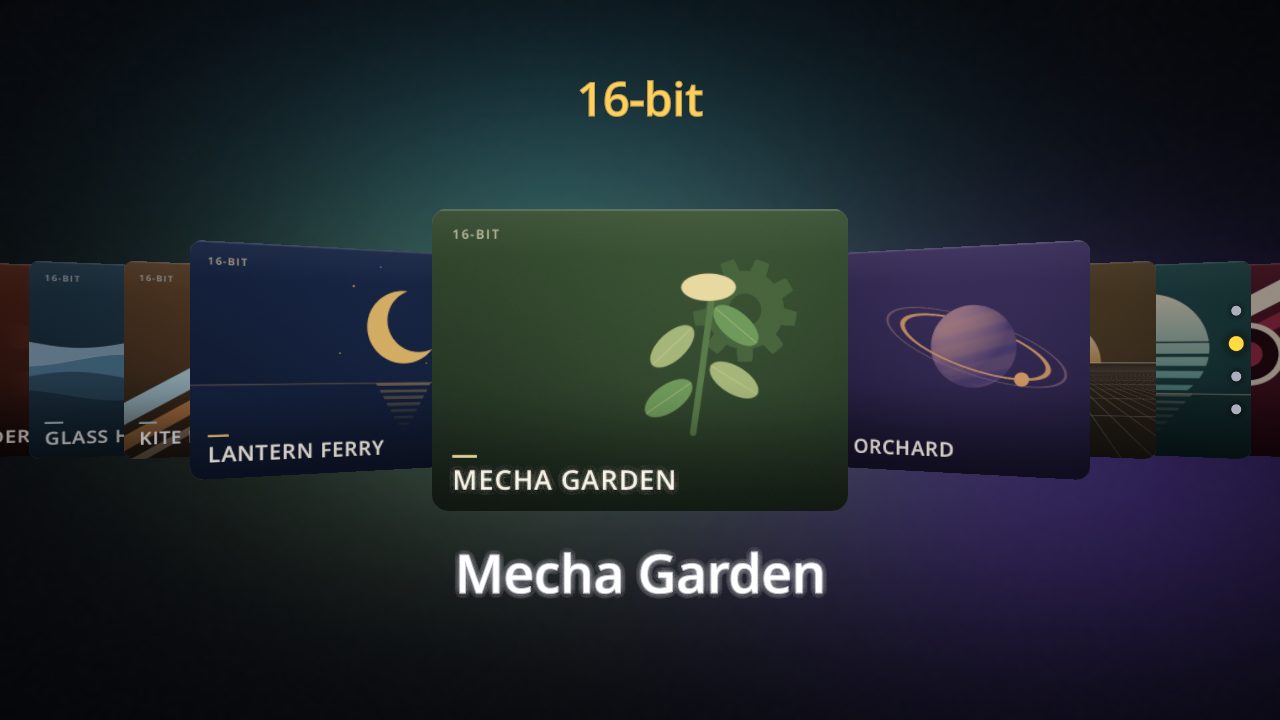
PolyConsole is an emulator frontend for the TV, the phone, the tablet and the desktop, from Android TV and Apple TV to the iPad and the Mac, and it runs on Oniq, the same engine as everything else I've written about here. I wanted something that behaves like a console: turn it on, pick a game, play, without setup screens, a menu for every emulator, or a hunt for the right core. It plays the games you already own, and it doesn't come with any.
PolyConsole isn't released yet. I plan to release it soon, and poly-console.com, which opens with this same launcher, is where that will happen.
One process, from the controller to the screen
Most emulator frontends launch a separate program to run each game. PolyConsole doesn't. It loads libretro coreIn libretro, one emulator packaged as a library that a frontend loads to run games for a particular system., the standard packaging for emulators, directly into its own process through their C interface, and drives them frame by frame. The launcher, the emulator and the engine drawing both of them are one program, which is how the launcher can boot a game on a card, fade between the shelf and the game, and pause into an Overlay networkA network built on top of another one. Its nodes talk over the existing internet but use their own addresses and routing. without anything flickering. The emulator gets a thread of its own inside that process, so a heavy core can't stall the launcher, and its frames are paced to the display's.
The line between the two projects is strict. Oniq never learns the words ROM, core or libretroA common programming interface for emulators. An emulator built as a libretro core can run inside any frontend that speaks it.. It offers one primitive, present a frame someone else produced, plus the shaders that can run over it, and PolyConsole builds everything emulator-specific on top. The two landed on the same day in June: PolyConsole's first CommitA saved snapshot of changes in a repository, identified by a unique hash, so any past state of the code can be named and found again., and the frame primitive it needed.
Systems that draw in 3D need more than a frame buffer, so for those PolyConsole creates a hidden OpenGL context, lets the core render into it, and hands the result to Oniq as a frame like any other.
Drop in games, play
PolyConsole indexes folders and archives on the device or on a network share, recognizes a game by its extension, its header or the system area of a disc image, and sets it on the right shelf. If a system needs a BIOS that isn't there, it says so plainly before launch instead of failing on a black screen. On the desktop it downloads the emulator a system needs the first time you play it. On Android the emulators ship with the app, and so they do on the iPad and the Apple TV, where Apple doesn't let an app download code.
It covers nearly a hundred systems through about 80 libretro cores: 8-bit and 16-bit consoles, handhelds, disc-based systems, arcade boards, early home computers, and a few free game engines. As of September that includes GameCube and Wii disc images. Arcade boards insert their own coins, so a coin-op game simply starts.
Box art is yours too. PolyConsole never scrapes it from the internet or ships it: it shows the images in your own library, and a quiet placeholder where there aren't any. That's also why every card in the figure above is generated, along with every title on it.
A console, not a toolkit
The rule I hold PolyConsole to is that it should feel like an appliance. That means saying no to a lot of things emulator frontends usually have, like a shelf of shader settings or a menu per core, and making the common things automatic:
- Every game saves and resumes on its own. Leave a game and come back to the same moment. Snapshots are taken as you play, so even a crash resumes from the latest one.
- Jump Back, a strip in the pause menu, keeps your recent moments as live thumbnails, so there are no save slots to manage.
- Rewind on cartridge systems when you're playing alone: hold Left and the game runs backward.
- Any controller the system recognizes works, plugged in or paired at any time, and announces itself when it connects. On a phone, an on-screen gamepad appears, hides itself when you clip the phone into a controller grip, and the launcher follows your finger.
- Hold Start and Select, or press Escape, for an overlay with save states, restart, the CRT filter and integer scaling.
- A scrapbook: press a button to keep a moment, then arrange your snapshots into pages.
- Parental controls per game, behind a PIN.
From picking a game to playing it, the budget is 1.5 seconds, and every launch logs how long it took.
Netplay, and the rollback I pulled
PolyConsole can host a game for friends in the same house. It runs the emulator in LockstepA multiplayer model where every player runs the same simulation on the same inputs and must reach exactly the same result each step, so any difference between machines breaks the game. on every machine with GGRS, the RustA programming language known for being fast and for catching whole classes of bugs before a program ever runs. implementation of GGPO's ideas, and it measures the round trip to pick the Input delayA few frames a networked game waits before acting on any input, so everyone's input can arrive in time.. Connections use signed tokens that carry a hash of the game file, so everyone in a session is running exactly the same game. A friend whose copy doesn't match, or who doesn't have the game at all, can still watch and chat.
A four-player match with a Windows desktop hosting, a Nvidia ShieldAn Android TV set-top box from Nvidia, popular for streaming and for playing games on a television. on Ethernet and two phones held 60 frames per second with no stalls. If a session does drift, a tripwire compares the machines' memory and PolyConsole resyncs them without ending the match.
Lockstep has one weakness: a late packet stalls everyone. The fix is RollbackA multiplayer technique where each machine guesses the inputs it has not received yet, and when the real ones arrive, rewinds a few steps and simulates them again with the correct inputs.. On a core that replays the same frames bit for bit, the property the Oniq article is all about, PolyConsole can predict the late input, keep playing, and correct a few frames later. Here's what that's worth, on a test rig that replays a 250 ms (millisecond)A thousandth of a second. Wi-Fi spike every eight seconds:
| Netplay mode | Frames per second through the spikes |
|---|---|
| Lockstep | about 40, stalled up to a third of the time |
| Rollback | 58 to 60 |
Every game runs in lockstep today anyway. The first core I certified for rollback passed the determinism check on one machine, then desynced between a Shield and a phone built on a different chip, so I pulled it. A core now has to prove itself in real sessions across different devices before it gets rollback, and one that DesyncWhen two machines that should be running the same simulation stop agreeing, so players see different games. later loses it again. The list of certified cores is served as data, so a core can be promoted without an app update. It's empty for now, and rollback waits for the first core to earn it.
On the TV
The Shield is where PolyConsole lives at home. It's a native Android app built from the same Rust code as the desktop version, packaged straight from Cargo, and it registers as a TV app, so it opens from the home screen like any other. Since October it runs on an Apple TV 4K too, from the same code.
The launcher is designed for ten feet away: big cards, a single focus, motion that settles instead of bouncing, and themes in a small TOML file. The figure above uses the default theme and a darker one from the app.
On the desktop it runs borderless fullscreen on whichever monitor you pick, with F11 or a menu row, and remembers the choice.
How it got here
The first commit is from June 1, 2026, and the first day ended with a game running on the Shield. The rest of June brought disc images, the live preview on the cards, more than thirty additional systems, NetplayPlaying a local multiplayer game with people on other machines, by running the same emulator in step on each one. with rollback, the on-screen gamepad and the on-screen keyboard. August went to hardening and the scrapbook. September brought Jump Back, rewind, touch control of the launcher, the emulator's own thread, crash-safe resume, GameCube and Wii, and the decision to hold rollback back until a core earns it. October took it to the Mac, the iPad and the Apple TV.
Today PolyConsole is about 60,000 lines of Rust with more than 600 tests, plus a test bot that plays real netplay matches, with real emulators, scripted inputs and deliberately degraded links, and grades each one from the reports every player writes.
What's coming
- Achievements, through RetroAchievements: the library is in and tested, and wiring it into the game loop is next.
- Netplay that slows for a moment instead of freezing when a packet is late, and rollback for the first core that earns it.
- Reading game archives straight from a network share on Android.
- 3D systems on the Mac, and a check of the ones on Linux.
- A first netplay match with an Apple TV, an iPad or a Mac in it.
PolyConsole isn't released yet, and I plan to release it soon. poly-console.com is where to watch for it.