
When I introduced PolyConsole, it lived on an Nvidia ShieldAn Android TV set-top box from Nvidia, popular for streaming and for playing games on a television. under my TV, with a desktop build and an Android phone build beside it. That was the whole map. In October it grew. PolyConsoleA game platform I'm building, with apps on Android and an online social service behind them. now builds for eight platforms:
- Android TV
- Apple TV
- Android phones and tablets
- iPad
- iPhone
- Windows
- macOS
- Linux
They all come out of the same RustA programming language known for being fast and for catching whole classes of bugs before a program ever runs. codebase, and every one of them carries the same NetplayPlaying a local multiplayer game with people on other machines, by running the same emulator in step on each one.. That second part is the one I care about.
A console is the box under one TV. PolyConsole wants to be every screen in the house, in the same game.
Eight targets, one tree
PolyConsole sits on Oniq, and Oniq already drew on Windows, macOS, Linux, Android and the browser, so much of the port was getting the same program to run in new places. The launcher, the library, the pause menu, saves, netplay and the online side are one body of code everywhere. What differs is how the emulators get onto the device.
On a computer, PolyConsole downloads the emulator a system needs from the libretroA common programming interface for emulators. An emulator built as a libretro core can run inside any frontend that speaks it. buildbot the first time you play it. On Android, about 80 cores ship inside the APK. On Apple's devices neither of those can work, and that's where most of October went.
| Platform | Where it stands |
|---|---|
| Android TV | Runs on the Shield, opens from the home screen like any TV app |
| Apple TV | Runs on an Apple TV 4K with the Siri Remote and a Bluetooth controller |
| Android phones and tablets | Runs on a Galaxy S21 and a Z Fold6, with touch controls or a controller grip |
| iPad | Runs on an iPad Pro, with touch controls and the on-screen keyboard |
| iPhone | Same app as the iPad, not yet tried on a real phone |
| Windows | Runs, 3D systems included |
| macOS | Runs on Apple silicon, 3D systems still to come |
| Linux | Builds and runs, 3D systems not yet checked on Linux |
Apple doesn't let an app download code
On Windows, Linux, macOS and Android, a libretro coreIn libretro, one emulator packaged as a library that a frontend loads to run games for a particular system. is a shared library PolyConsole opens while it runs. iPhone, iPad and Apple TV don't allow that for code that didn't come with the app, so on those devices every core is built into the app bundle as a signed framework and loaded from there. The Apple TV build carries about seventy of them.
The same rule covers helper programs. PolyConsole used to hand .7z archives to the 7-Zip program, which an iPhone, iPad or Apple TV app can't start, so on those devices it now reads them itself with a decoder written in Rust.
The rule with real costs is the next one: apps on those devices can't use JIT (just-in-time compilation)Translating code into the processor's own instructions while a program runs. Emulators for newer consoles rely on it for speed, and Apple doesn't let apps do it on iPhone, iPad or Apple TV.. The emulators for newer consoles lean on it to translate the console's machine code as they go, and Dolphin, the GameCube and Wii emulator, is far too slow without it. So Apple TV and iPad go without GameCube and Wii, along with a handful of cores that have no Apple build at all. When a game lands on one of those shelves, the app tells you it can't run there, instead of failing on launch.
The Nintendo 64 does make the trip. Its emulator draws in 3D through OpenGL, so Oniq gained an OpenGL ES context on iPhone, iPad and Apple TV for it to draw into, and without a JIT it runs as an interpreter. In the Apple TV simulator it boots a game straight out of a .7z and races in 3D. I haven't played one on the TV itself yet, and the heaviest games are likely to be slow.
The Mac is the easy case: it downloads cores like the other desktops, from the buildbot's Apple siliconThe processors Apple designs for its own Macs, starting with the M1 in 2020. They are Arm processors, with memory that the CPU and GPU share. folder. What it lacks for now is the desktop OpenGL context that 3D cores render into, so the N64 and the Dreamcast run on Windows and Android, but not yet on the Mac.
Teaching the stack about tvOS
The Apple TV was the hard one. tvOSThe operating system on Apple TV, a close relative of the one on the iPhone and iPad. is a tier-three target for Rust, which means the compiler knows it but its standard library isn't shipped prebuilt, and a fair number of the crates under a game had never been compiled for it. Oniq now handles the window, the input and the display timing itself instead of leaning on a crate that didn't know tvOS. The rest came one at a time:
- Sound. The audio crate had no tvOS backend at all, so the first Apple TV build was silent. Oniq carries a patched copy that adds one.
- Netplay. The WebRTCA standard for connecting two devices directly, even from behind home routers, so they can trade audio, video or data without a server in the middle. stack depends on an old system-call crate that predates tvOS support. It uses that crate for one thing: listing the device's network addresses, so a peer knows where it can be reached. PolyConsole carries a small patched copy that uses a newer version.
- Keys. Each device signs its netplay invitations with its own key, kept in the system keychain. On Apple's devices the keychain refuses to store anything until the app declares an entitlement for it, and the error says only that an entitlement is missing.
- Controllers. My 8BitDo arcade stick moved the menus but did nothing in games. tvOS only hands an app a game controller if the app says up front that it supports one. Otherwise it turns the controller into remote presses, which drive menus well and play games not at all.
- The Menu button. On the Siri Remote it means "back", but the engine was dropping it on the floor, so neither the remote nor the stick could leave the library screen. It now arrives as one press of player one's B button, the button that backs out of everything else.
The iPad needed less. It reads your games from the Files app or a share on your network, and it got the on-screen keyboard, the touch controls and a layout that fits a 4:3 screen. Big network libraries got faster along the way: a share full of game archives used to take more than seven minutes to show its first row on the iPad, and now it takes about seven seconds.
What travels between screens
Netplay in PolyConsole sends inputs and nothing else. Every machine runs its own copy of the emulator, and each frame they exchange what the players pressed. It's LockstepA multiplayer model where every player runs the same simulation on the same inputs and must reach exactly the same result each step, so any difference between machines breaks the game., the model Oniq is built around: no machine moves ahead until it has everyone's input for that frame. That's why a match doesn't care what each player is holding. A Shield, a phone and a PC don't need to agree on anything except the buttons.
The token is what makes that safe to do across the internet. The host signs it with its device key, and it carries a hash of the game file, so a friend's copy has to be the same game byte for byte before they get a seat. A friend whose copy doesn't match can still watch and chat. The connection itself is WebRTC, peer to peer: a small Signaling serverA small server that introduces two devices so they can connect to each other directly. Once they're connected, their traffic no longer passes through it. I run in the cloud introduces the two machines and then gets out of the way. PolyConsole measures the round trip and sets the Input delayA few frames a networked game waits before acting on any input, so everyone's input can arrive in time. from it. On my home network that settles at two frames, about 33 milliseconds.
Under the token, there's no host at all. Both machines derive the same room from it, the netcode seats players in a fixed order, and from the first frame they run the same code path. "Host" and "join" are just two ways of getting hold of the same token. Apart from that one patched crate on tvOS, nothing in PolyConsole's netplay had to change to bring new platforms in, which is the point of building it that way.
Different chips, same frame
Lockstep only works if every machine computes exactly the same next frame from the same inputs. Across eight platforms that means x86 desktops and several generations of ARM, from the Shield's Tegra to a phone's Snapdragon to Apple's own chips. The emulators are C and C++ compiled separately for each one.
Everywhere I've tested it, they've held. A Windows PC and the Shield played Golden Axe in lockstep with no DesyncWhen two machines that should be running the same simulation stop agreeing, so players see different games., which is x86 against ARM. Mario Kart 64 ran between the Shield and a Galaxy S21 with no desyncs either: two different ARM chips, and two different GPU (graphics processing unit)The chip that trains and runs AI models far faster than a computer's main processor. drawing the race. The GPUs don't matter. Each device draws its own picture, and only the game's state has to agree.
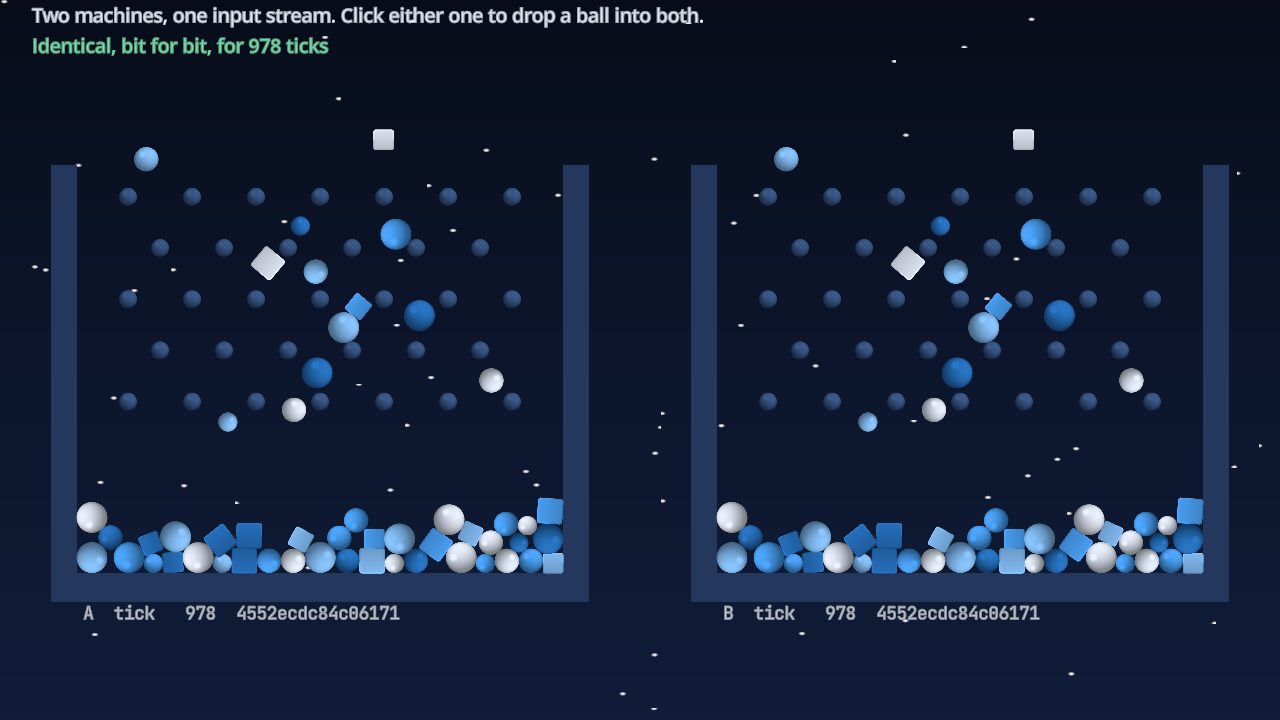
When it doesn't agree, PolyConsole notices. Each machine hashes the emulator's memory as it plays, the same tripwire the figure above runs, and a mismatch makes PolyConsole copy the good state across and carry on. A dropped player rejoins the same way: I put the phone in airplane mode for twenty seconds in the middle of a match, and when the radio came back it reconnected, loaded the host's state and picked up where the others were.
What has actually played together
These are the matches I've played across devices, measured on the devices themselves:
| Players | Devices | Network | Result |
|---|---|---|---|
| 2 | Windows PC and Shield | Home network | Golden Axe, no desyncs |
| 2 | Shield and Galaxy S21 | Home network | Mario Kart 64 and Super Mario Kart, no desyncs |
| 4 | Windows PC, Shield on Ethernet, Galaxy S21, Z Fold6 | Home network | 60 frames per second, no stalls |
| 2 | Z Fold6 on LTE and a desktop | Internet, through the signaling server | 150 to 170 ms round trips, no desyncs, with lockstep stalls |
The last row is the internet case. At those distances lockstep keeps everyone in sync and pays for it in stalls: in an earlier run over the same LTE link, Golden Axe ran at 40 to 53 frames per second. That's playable, and it's why RollbackA multiplayer technique where each machine guesses the inputs it has not received yet, and when the real ones arrive, rewinds a few steps and simulates them again with the correct inputs., which I pulled in September until a core proves it stays in step across devices, is still the next big step for netplay.
The Apple builds aren't in that table yet. The Apple TV, the iPad and the Mac all build with the same netplay, and in the tvOS simulator I checked the pieces it needed one by one: the network addresses and the keychain. But the simulators can't load the device-only cores, so a real match has to happen on hardware, and an Apple TV against the Shield is next. When it's played, it gets a row.
What's true today
- PolyConsole isn't released. The Apple builds are installed with a personal developer profile, which Apple expires after a week.
- iPhone hasn't run on a real phone yet. It's the same app as the iPad, so I expect it to be mostly a matter of trying.
- 3D systems run on Windows and Android, and on Apple TV in the simulator. The Mac doesn't have them yet, and on Linux the code is written but unchecked.
- On Apple TV, saves live in a cache folder, because tvOS gives apps no local storage it promises to keep, and it can clear that folder when space runs low. A save there isn't safe yet.
- Netplay is lockstep everywhere. Over a long internet link it stalls, and rollback waits for a core that earns it.
- The online side, with friends, invites and chat, runs on a service I host, and it isn't open to the public.
The house as one console
In June, PolyConsole was a game running on one TV. In October it opened on an Apple TV for the first time, on an iPad, and on a Mac, and none of the launcher, the library or the netplay had to be rewritten to get there. That's the payoff of keeping one codebase and drawing the line between engine and emulator so firmly: a new platform is a matter of getting cores onto it and teaching the engine about it.
What I want from it is simple. Whoever comes over picks up whatever screen is nearest, a phone or the TV or the laptop on the counter, and we're in the same game.
PolyConsole isn't released yet, and I plan to release it soon. poly-console.com is where to watch for it.